CD/DVD Drive1 (Connecting…) VMWare Console
Recently i was trying to mount ISO file from local disk to VM Console using CD/DVD Drive and it got stuck saying Connecting but it never got connected. Even i tried closing the console and re-opened it but all in vain.

So, while troubleshooting i found two ways to resolve the above issue.
First Way
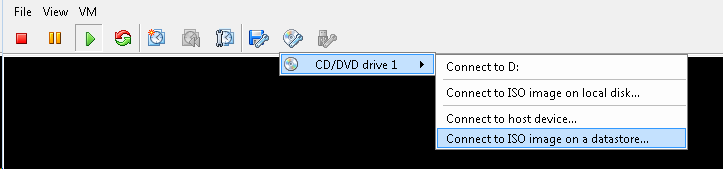
- Store the ISO image in the datastore and use “Connect to ISO Image on a datastore”.
Second Way
- If you still want mount the ISO file using local disk, you have to follow the below steps.
- Right Click the VM Name > Click on Edit Settings
- Click on CD/DVD Drive 1 > Radio Check on the Mode from Emulate IDE to Passthrough IDE (recommended) and Click on OK
- Close VMware VSphere Client and re-launch it.
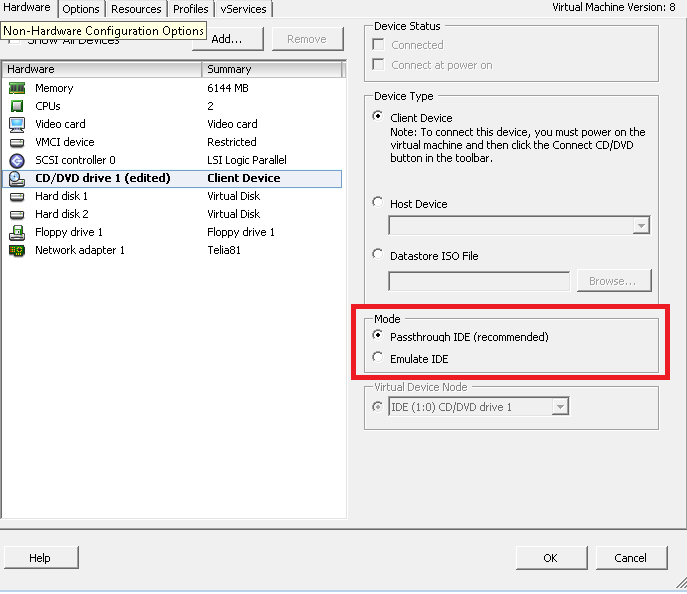
Note: The Passthrough device mode can only be used on one virtual machine at a time.
Hope this helps!!